It’s slowly starting to get cold again. Time to use Home Assistant to control the heating again. But this time even smarter than before. With Better Thermostat!
You’re probably wondering how heating control in Home Assistant can get any smarter? Better Thermostat shifts temperature control from the thermostats* to Home Assistant.
Thermostats usually only switch on when the current temperature is below the target temperature and switch off as soon as the target temperature is exceeded. Better Thermostat, however, regulates the temperature more intelligently. For example, once the target temperature of 21 °C has been reached, the temperature is reduced to 18 °C instead of switching off the thermostat. This reduces a kind of yo-yo effect and stabilises the desired target temperature much better than other methods.
There are also options to connect a window contact sensor* or an external temperature sensor*. This saves you from having to manually create automations for these sensors.
Better Thermostat can be found in the HACS Store.
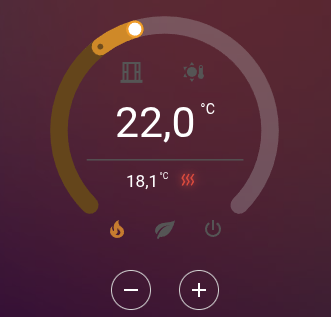
Bonus tip: download the Better Thermostat UI Card as well. Unlike the normal Climate Card, this card can show whether the window is open*, display humidity* and provide an eco mode, even if the thermostat you are using does not support it.
I personally like that the ‘heating’ symbol lights up red when the temperature has fallen below the target temperature and heating is currently in progress: