Making dumb devices smart is probably the favourite hobby of every smart home nerd. I recently integrated a fill level indicator for the automatic feeder into Home Assistant. I achieved this with an ESP32* and an ultrasonic sensor.
First of all, I would like to clarify that the results in my case are not as accurate as I had imagined. But more on that later.
My goal was to have Home Assistant display how full the dry food dispenser is. It is usually refilled every few weeks. My idea was to measure the distance between the lid and the food. If the distance is greater than X, it needs to be refilled.
Build-up
This project was my first encounter with an ESP32 board*. I had heard of it before, but didn’t really understand how it worked.
Note: Home Assistant must be accessible via https for the steps described below!
You will need:
- Micro-USB cable + power brick*
- ESP32 board*
- Ultrasonic sensor*
- Jumper cable*
- Double-sided adhesive tape*
Configuration
First, install ESPHome in Home Assistant. You can find it in the add-ons.
Then connect the ESP32* to your Home Assistant device via USB.
Now open ESPHome and click on ‘New device – Continue’. Enter a name and click on ‘Next’. Then select ESP32*. An encryption key will be displayed. Save this and click on “install”. Now click on ‘plug into this computer’. Finally, enter your Wi-Fi settings.
The firmware will now be installed on the ESP32*. This may take a while.
You can then find the device under ESPHome.
For the next step, go to the website https://www.esphome.io and select the device you are using. In my case, this is the ultrasonic sensor. There you will find the parameters you need to integrate the sensor. Copy these and paste them into Home Assistant’s ESPHome by clicking on ‘EDIT’ for your device and adding the parameters at the very bottom. For me, it looks like this:
captive_portal:

sensor:
  - platform: ultrasonic
    trigger_pin: GPIO5
    echo_pin: GPIO18
    name: "Ultrasonic Sensor"
    update_interval: 600s
On my ESP32 board, the pins are not GPIO, but named with D. This page helped me with the referencing. Then connect 5V and ground and you’re done.
It is now connected as follows:
Vcc – VIN
Trig – D5
Echo – D18
GND – GND
Result
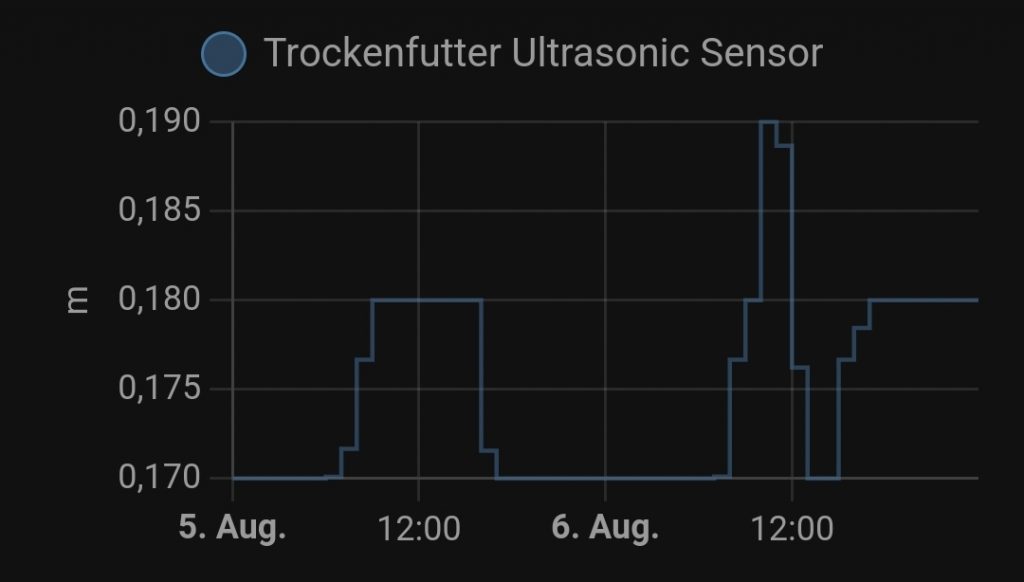
The ultrasonic sensor now displays the distance in Home Assistant.

But why does this setup not quite meet my expectations? Quite simply: I have very large fluctuations in the measured values, even when nothing has changed. I assume this is because ultrasonic sensors work best when measuring the distance to a flat surface. The fact that dry food naturally has a very uneven structure probably causes these fluctuations.
Can the ultrasonic sensor be used as a motion detector? I would say no! The ultrasonic sensor only has a range of approximately 2 metres, which is quite limited for a motion sensor. In addition, ESP32 boards are more expensive than simple motion detectors. Furthermore, ESP32 boards require an external power supply, which is not the case with motion detectors.