I previously showed you how to integrate Telegram into Home Assistant and what the advantages are.
This time, I would like to show you how to control Home Assistant with Telegram. We only need two automations for this.
The Telegram commands are sent via Telegram’s inline keyboard. This is similar to the quick replies you know from other chat apps. The difference is that we can create these buttons ourselves.
To see this button, send yourself a Telegram message from an automation. In the ‘data’ field, write the following:
inline_keyboard:
  - - - Toggle Lamp
      - /LampToggle
Below the chat message, you will see a button labelled ‘Toggle lamp’.
To react to the button, create a new automation. Use an event trigger as the trigger. Enter telegram_callback as the event type. Under ‘Event data’, enter command: /LampToggle.
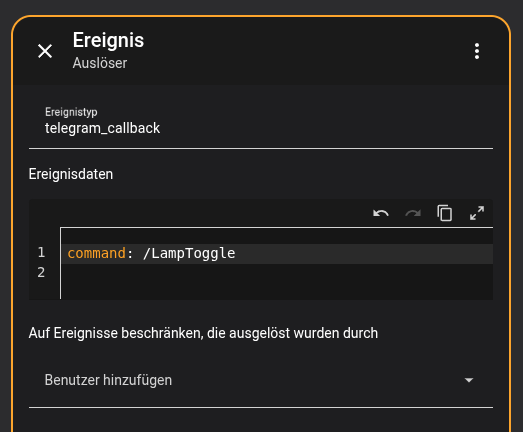
You can enter anything you like as a trigger. For example, I’ll turn the lamp on and off here.