I have integrated two Tapo IP cameras into my smart home. These are currently available on Amazon* for less than 25 Euro. I mostly use the cameras to see what the cats are up to when no one is at home.
I also receive a notification as soon as the camera detects movement. But the notifications were a little annoying in the long run, yet I still wanted to know what was going on at home.
Then I saw this video and was thrilled!
The video uses the LLM Vision add-on. This allows you to send your video, image or camera stream directly to your trusted AI, which then describes what is happening in the video.
I generated a Gemini API for this purpose, as it can be used free of charge to a certain extent.
You can then create an automation. Here is an example:
- Trigger: Camera detects movement
- Condition: Only, when noone is at home
- Action:
- LLM Vision: Stream Analyzer
- Provider: Gemini
- Prompt: Briefly summarise what you see (can be customised, of course)
- Remember: Activate (I’ll get to that in a moment)
- Camera Entity: The camera stream
- Response variable: AILivingroom
You can leave everything else at the default settings.
You can send the AI’s response to your smartphone as a notification using the above-mentioned response variable. Simply enter {{AILivingroom}} as the message.
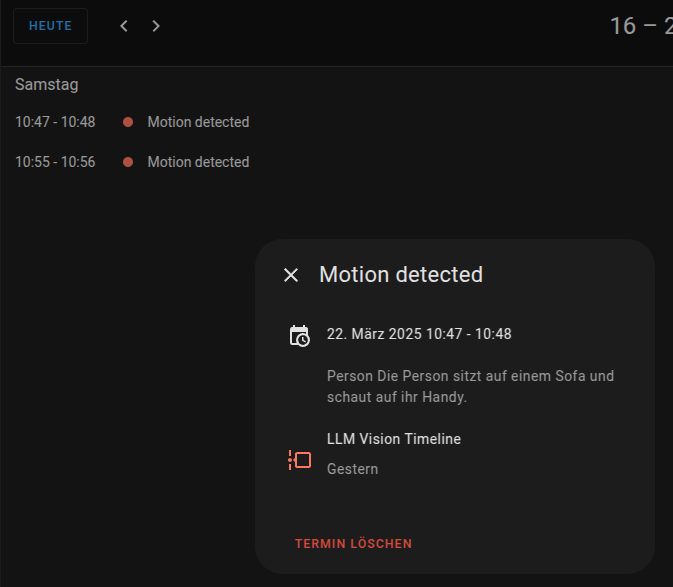
Another cool feature is Timeline. To use it, click on ‘Settings – Devices and Services – LLM Vision – Add Entry’ and select ‘Timeline’. LLM Vision will now create a calendar and write all events with date and time as calendar entries. You can find the calendar entry in the built-in calendar function of Home Assistant.
With this information, you can digitise all kinds of everyday situations. It doesn’t necessarily have to be a description of the current scene. Here are some more examples of how image recognition can be used:
- Camera in the refrigerator and AI tells you what you need to buy or what you can cook.
- Point the camera at the heating or electricity meter to make it ‘smart’ via this workaround and integrate it into Home Assistant if necessary.
- Check if there is a stranger in your parking space.
- Count the number of animals in the barn.
- Detect people falling or other emergencies.